Speedometer: GPS Speedometer
- 4.5
- Rating
- 10.00M
- Installs
- Free
- Price
 Analysis by App-foxy
I use my phone for navigation often, but I do not always need full turn-by-turn guidance. Sometimes I simply want a clear view of my current speed, a quick check against the posted limit, or a distance reading while traveling. That is the space where Speedometer: GPS Speedometer makes sense. It is a focused Maps & Navigation app from Simple Design Ltd. rather than an attempt to replace every navigation tool on a phone.
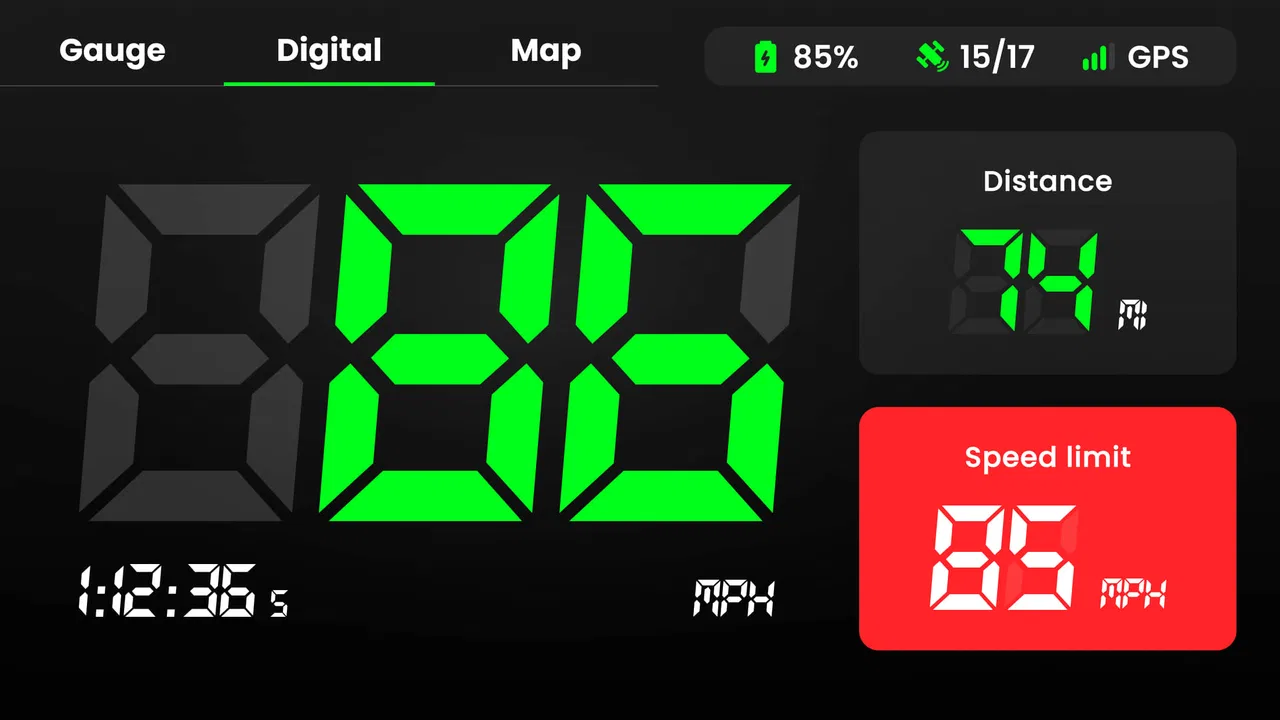
My first impression was that its value depends less on having a long feature list and more on whether you want a dedicated driving display. The app uses GPS to show speed and distance, while also presenting speed-limit and time information. That narrow purpose is useful when the dashboard is hard to read, when you are cycling or walking, or when you want a second view beside a conventional navigation app.
How I decided whether it was worth using
I judged it by four practical questions. Is the information easy to read while moving? Does the GPS reading become useful quickly enough for ordinary trips? Can it complement a navigation app without creating unnecessary distraction? And does its free entry point offer enough value before any optional purchase becomes relevant?
You May Also Like

 Pandora - Music & Podcasts
Pandora’s Music Is Easy to Start, but Harder to Recover
Pandora’s strength is its low-effort path from a seed to a station. Its weak spot is how much confidence it asks you to place in connection, setup, and quiet recovery.

 AccuWeather: Weather Radar
AccuWeather Review: A Quick, Clear Forecast for Everyday Decisions
For everyday plans, the best forecast is the one you can understand quickly. AccuWeather makes rain timing, radar, and local conditions easy to act on, with a few trade-offs.

 Hill Climb Racing
Why Hill Climb Racing Still Turns Crashes Into One More Run
A tiny car, a bumpy hill and one more upgrade: Hill Climb Racing keeps resurfacing because its simple chaos makes every near-miss feel personal.

 AliExpress - Shopping App
AliExpress Makes Global Shopping Feel Personal, but Shoppers Bear the Risk
AliExpress turns a global marketplace into a pocket-sized discovery engine. Its reach is useful, its shopping loop compelling, and its trade-offs easy to miss.

 Lords Mobile: Kingdom Wars
Lords Mobile Is a Kingdom-Building Routine, Not a Quick Match
A case-by-case verdict on the building, battles, device demands, and social commitments that make Lords Mobile rewarding for some players and exhausting for others.

 PDF Scanner app - TapScanner
TapScanner Makes Paperwork Easier to Capture, Check, and Share
TapScanner makes scanning with a phone feel less like a rescue operation and more like a dependable step in getting work done. Its capture tools are useful, though not flawless.
More From Our News Desk
View All News


Those questions matter because a speedometer app is not competing only with other speedometer apps. It is also competing with the vehicle’s built-in display, a navigation app showing speed, a cycling computer, and simple instrument hardware. Each alternative solves a slightly different problem. A phone app wins when convenience and flexibility matter, but it is not automatically the safest or most accurate choice for every vehicle.
The app is free to install and is suitable for Everyone. It runs on Android devices using version 6.0 or later, which makes it accessible to people with older phones as well as newer models. The current version is 1.2.5, and the app has passed the point where it feels like an obscure experiment: it has more than ten million installs, an average rating of 4.5 from roughly 152 thousand ratings, and about 4.8 thousand written reviews.
I would still treat those figures as a sign of broad interest rather than proof that it will fit every driving setup. GPS performance depends on the phone, its position, the surrounding buildings, weather conditions, and the quality of the satellite signal. A good app can present the information neatly, but it cannot turn a weak signal into a perfect measurement.
The everyday situation where it helped most
A realistic example is a rental car with a dashboard that is unfamiliar or partly hidden by the steering wheel. I can place the phone in a secure mount, open the app, and use the large speed display as a quick reference while keeping the route guidance on another device or screen. That is especially handy on a long road where I already know the route and do not need constant map instructions.
I also found the distance view useful for trips where the route itself was not the main concern. If I am walking a planned loop, riding as a passenger, or checking how far a road journey has progressed, a dedicated distance reading is easier to consult than a full navigation interface filled with map details. The app’s value comes from reducing the display to the information I actually want.
There is an important habit here: I set everything up before moving. I choose the phone position, start the app, confirm that the GPS reading has settled, and then leave the device alone. Looking down repeatedly to compare a number with the road sign defeats the purpose of a simple dashboard. The app works best as a glanceable aid, not as something to operate continuously in traffic.
What the focused design does better than a normal navigation app
Traditional navigation apps are excellent when I need route planning, traffic information, destinations, and spoken directions. They can also show speed in some situations, but that information is usually one element among many. A dedicated speedometer keeps the central task obvious: check speed, distance, speed limit, or time without searching through a crowded map screen.
That difference becomes more noticeable on a motorcycle, bicycle, or older car. A navigation app may spend most of its screen on roads and turns that are irrelevant once I know where I am going. This app is more appropriate when I need an instrument-like view rather than a map. It also avoids forcing me to plan a route simply to obtain basic travel information.
The speed-limit display is another useful part of the concept. I can use it as a reminder to compare my current speed with the limit shown by the app, but I would never treat it as a replacement for roadside signs. Temporary restrictions, construction zones, private roads, changing regulations, and GPS uncertainty can all make a displayed limit less reliable than what I see directly on the road.
That is one of the less obvious trade-offs. A speed-limit indicator feels reassuring, yet it can encourage overconfidence if I stop paying attention to signs. I regard it as a secondary reference that supports awareness, not as legal authority. The same principle applies to the speed reading: it is useful for orientation, but the vehicle’s certified instruments may be the better reference where precision has legal or professional consequences.
Small workflow choices that improve the experience
My first tip is to test the app while stationary in the place where I plan to use it. A phone mounted low on the dashboard may be readable in the driveway but awkward once sunlight hits the screen. Testing the angle and brightness beforehand prevents last-minute adjustments during a trip. A secure mount is more important than squeezing the phone into the most visible position.
My second tip is to compare the reading over a steady stretch rather than judging it during acceleration or braking. GPS-based speed can respond differently from the car’s display, especially when the vehicle changes speed quickly. A stable section of road gives a more useful sense of how the two readings relate on that particular phone and vehicle.
My third tip is to use the distance function for planning rather than treating it as a formal trip log. For example, I can check whether a walking loop is roughly the length I expected, or estimate progress on a drive. I would not use a phone speedometer as the sole record for reimbursable mileage, professional transport, or any situation where a documented measurement is required.
A fourth practical point is battery planning. Keeping the screen active, using GPS, and possibly running another navigation app at the same time can place more demand on a phone than ordinary reading or messaging. I would begin a long journey with a charged device and, when appropriate, a safe power source. The app itself may be simple, but the way it is used can still affect the phone’s endurance.
Where the app is not the best choice
If my main need is turn-by-turn navigation, I would choose a full navigation app instead. A speedometer cannot replace route search, traffic-aware directions, destination discovery, or the broader planning tools found in that category. Using it as the only driving app would leave me solving the wrong problem.
I would also hesitate to use a phone as the primary instrument on a motorcycle if the display is difficult to read in sunlight or the mounting arrangement is not secure. A purpose-built motorcycle computer may be a better fit for riders who need weather resistance, physical controls, or dependable visibility. The phone app is attractive because I already own the hardware, not because it automatically beats dedicated equipment.
For serious cycling training, a cycling computer can offer a more complete workflow than a basic GPS speed display. It may be preferable when structured workouts, sensor support, durable mounting, or long recording sessions are central to the decision. I would not buy this app expecting it to become a full training platform.
Likewise, drivers who already have a clear, trusted speed display in the vehicle may gain little. In that case, the phone introduces another screen rather than solving a real problem. The strongest reason to use this app is a specific gap: a missing, inconvenient, hard-to-read, or supplementary speed display.
What switching really involves
Switching from a normal navigation app is easy in one sense: the app is free, the purpose is immediately understandable, and there is no need to learn a complex route-planning system. I can install it, mount the phone, and decide within a short drive whether the display suits me. That low commitment is one of its strongest advantages.
The cost of switching is mostly practical rather than financial. I need to remember to open a separate app, choose a safe mounting position, and manage the phone if I also want directions. If I move between walking, cycling, and driving, I may also need to reconsider how visible the display should be and whether the current activity makes phone use appropriate at all.
The app includes optional in-app purchases priced from $4.49 to $49.99 per item. That makes it sensible to start with the free experience and decide whether the additional value is relevant to my routine before spending money. I would not pay simply because the app has a narrow purpose; I would pay only if it becomes a regular tool and the optional functions solve a problem I actually have.
That pricing range also changes the comparison with hardware. A free phone app can be the cheapest way to experiment, but a dedicated device may justify its cost for frequent riders or professional drivers because it is designed around visibility and continuous use. The best choice depends on how often I need the information and how demanding the environment is, not just on the initial price.
My recommendation for different kinds of users
I recommend Speedometer: GPS Speedometer to drivers who want a clean supplementary display, cyclists and walkers who need basic speed or distance awareness, and anyone whose vehicle dashboard is inconvenient to read. It is also a sensible trial for people who do not want a full navigation interface when they are already familiar with the route.
I would skip it if I need professional-grade measurement, comprehensive navigation, detailed cycling analysis, or a display that must remain dependable in harsh conditions. I would also skip it if my vehicle already provides everything clearly and I have no reason to add another screen. In those cases, the usual alternative is not merely different; it is better matched to the job.
Simple Design Ltd. has kept the concept approachable, and the broad adoption reflected in its ten-million-plus install count suggests that many people understand the appeal. Still, popularity does not remove the need for sensible use. GPS readings should be treated as practical guidance, speed-limit information should be checked against road signs, and the phone should be configured before the journey begins.
My final view is that this is a useful specialist tool rather than a universal navigation solution. Its strength is clarity: it gives a phone a dashboard-like role without asking me to manage a full route. The free starting point makes experimentation easy, while the limitations are clear enough to plan around. If what I want is a straightforward speed and distance companion, I would recommend trying it. If I need navigation, certified accuracy, or dedicated outdoor hardware, I would choose a more purpose-built alternative instead.
FAQs for Speedometer: GPS Speedometer
01What is Speedometer: GPS Speedometer and how does it work?
Speedometer: GPS Speedometer is an app designed to measure your speed and distance using GPS technology. It provides real-time speed data, average speed, and maximum speed during your trips. The app uses your device’s GPS to track movement, making it a handy tool for driving, cycling, or walking.
02Is Speedometer: GPS Speedometer accurate?
The accuracy of Speedometer: GPS Speedometer depends on the quality of your device's GPS signal. In areas with strong satellite connectivity, such as open roads or wide spaces, the app tends to be highly accurate. However, in areas with poor GPS reception, like tunnels or dense urban environments, accuracy may decrease.
03Does the app require an internet connection to function?
Speedometer: GPS Speedometer primarily relies on GPS signals to track speed and distance, which does not require an internet connection. However, certain features, like map integration or data syncing, might need internet access. It's best to check specific app settings for any additional requirements.
04Can I use Speedometer: GPS Speedometer while driving?
Yes, you can use the app while driving to monitor your speed. However, it's important to prioritize safety. Ensure your device is securely mounted and avoid interacting with the app while driving. The app is designed to provide information at a glance, minimizing distraction.
05Is Speedometer: GPS Speedometer free to use or are there in-app purchases?
Speedometer: GPS Speedometer is typically available as a free download with basic features included. However, there may be in-app purchases for advanced features, such as ad removal or additional customization options. Checking the app store listing will provide detailed information on available purchases.
Pros
- Accurate real-time speed tracking
- User-friendly interface design
- Customizable speed units
- Offline functionality available
- Battery-efficient operation
Cons
- Ads can be intrusive
- Limited features in free version
- No voice navigation support
- Occasional GPS signal issues
- Lacks a speed limit alert option

Speedometer: GPS Speedometer
Gallery